Maps + filters · outreach lists
Find companies and local businesses without websites
For sales, recruiters, and agencies who need a contactable list — not a directory to resell, and not a “build me a website” marketplace. Pull Maps results, filter to no website, export CSV.
Who this is for
People who already know their niche and geography, and want businesses that are visible on Google Maps but have no website URL — for cold outreach, partnership lists, or agency prospecting.
Why Maps? Local listings already include name, phone, address, rating, and category. LeadsMap adds batch collection and a website filter so you can isolate no-site leads without building a separate database product.
Collect → Filter no website → Enrich → CSV
- 1
Collect from Google Maps
Use Collect this page on a Maps search, or Batch Collect across keywords and cities so you are not stuck at ~120 results per query.
- 2
Filter: no website
In the dashboard filter panel, set Website to No. You keep listings that have no website URL — ideal for outreach or agency offers.
- 3
Enrich (optional)
If some rows later gain sites or you mix filters, enrichment can pull emails and social from websites that do exist.
- 4
Export CSV
Export the filtered set during your 3-day trial or on Pro — current page, selection, or full matching campaign.
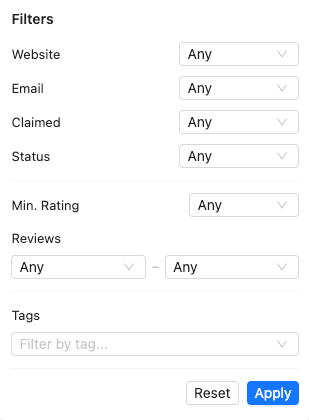
Filter panel: Website = No (plus rating, reviews, tags, and more). See How filters work.
Businesses without a website near me
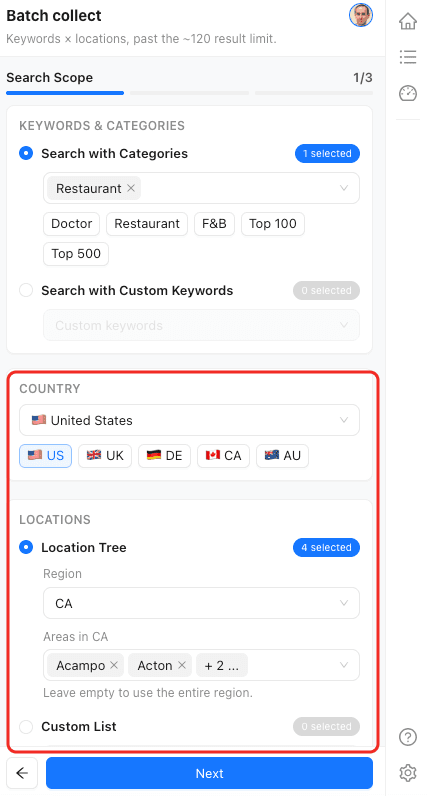
“Near me” in LeadsMap means the city or area you choose in Google Maps / Batch locations — not a browser GPS magic button. Pick your market, run Batch Collect, then apply the no-website filter and export.
- Select target cities or a location tree in Batch Collect
- Run keywords for your niche (e.g. dentists, plumbers, restaurants)
- Filter Website → No, then download CSV
Vertical examples
Same funnel by industry. Start with the dentists walkthrough; more use-case pages come later.
- Example: dentists with no website — video tutorial
- Google Maps Scraper — product capabilities & fields
- Filters documentation — website / rating / tags
Ready to build the list?
Install the Chrome extension, sign in for a 3-day full-feature trial, then filter to businesses without websites.
Install & start free trial