Email and social enrichment
Enrichment opens each lead's website and reads public contact details from the page. The results are stored on the lead and included when you export. Enrichment is available on the Free plan.
What is collected
From a business website, LeadsMap looks for:
- Email addresses
- Phone numbers published on the site, kept separate from the Google Maps phone
- Facebook, Instagram, LinkedIn, X (Twitter), YouTube, TikTok, and WhatsApp
A website that has already been read is not fetched again for the same domain. Leads with no website are skipped.
Enrich one lead
- Open the dashboard and select the campaign.
- In the Web column, use Crawl contact info from website on that row. If the site was crawled before, the action is Re-crawl contacts from website.
- In the confirmation window, titled Crawl Contact Info or Re-crawl Contact Info, click Start Crawling.
- When it finishes, open the lead. The Google Maps phone and the website details are shown together.
Enrich the campaign
- Select the campaign. The toolbar button Scrape Contacts is enabled when at least one visible lead has a website.
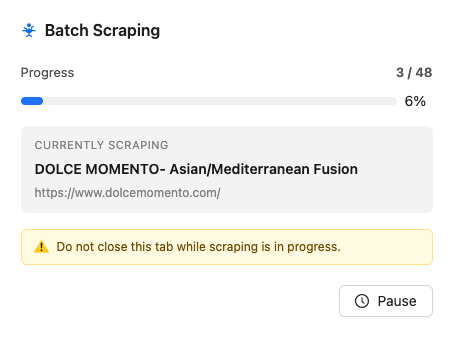
- Click Scrape Contacts. A window titled Batch Scraping opens and shows progress, the current business, and its website.
- Use Pause to stop between sites, then resume. When every site has been handled, the title changes to Scraping Complete.
- While a batch is running, the toolbar button shows Scraping… and the counts. Click it to return to the progress window.
Where the data appears
Emails and social profiles show on the lead and in the Web and Contact columns. CSV export adds them as Emails, Website Phones, Facebook, Instagram, LinkedIn, Twitter/X, WhatsApp, YouTube, and TikTok. See Export.